Freeware from Funduc Software
Our freeware applications are available for Windows Vista, Windows 7, Windows8, & Windows 10: Funduc Software Touch, FS ZIP Extractor, TZAdjust, Word Search and Replace, Excel Search and Replace, and PowerPoint Search and Replace.
Please see Install & Uninstall Information guidance about installation and License Information for EULA statements.
We hope you find the programs useful!

Funduc Software Touch is a free 'touch' utility that allows you to change the time/date &/or attribute stamps on one or more files. In addition, FS Touch can add/subtract a specified number of seconds from the existing file time. The program can be run from interactively or the command line. The program runs on Windows Vista, Windows 7, Windows 8, & Windows 10.
Please see the primary FS Touch page for more information.
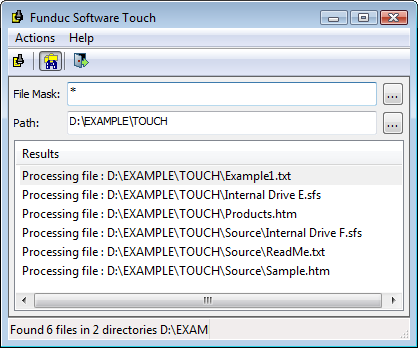
fstouch.zip (990 K) - Zip version (32-bit). Download this to a temporary directory, UnZIP this into the subdirectory of your choice and follow the instructions in "Install.txt". The program itself consists of a single exe file so if you want to run the program from a USB drive, the zip version will be fine. To 'uninstall' simply delete file(s) you unzipped.
setupfst.exe (1.3 MB) - Self-install version (32-bit). No files are added to your 'system' subdirectory. To uninstall use the Control Panel 'Add/Remove Programs' or 'Programs and Features' function for your operating system and locate FS Touch. Follow the operating system procedures to uninstall. The program installer defaults to C:\Program Files\FSTouch for the installation path. If you plan on running the program via the command line you may find it easier to change that to a path that does not contain spaces.
fstouch64.zip (1.2 MB) -Zip version (64-bit). Download this to a temporary directory, UnZIP this into the subdirectory of your choice and follow the instructions in "Install.txt". The program itself consists of a single exe file so if you want to run the program from a USB drive, the zip version will be fine. To 'uninstall' simply delete file(s) you unzipped.
setupfst64.exe (1.5 MB) - Self-install version (64-bit). No files are added to your 'system' subdirectory. To uninstall use the Control Panel 'Add/Remove Programs' or 'Programs and Features' function for your operating system and locate FS Touch. Follow the operating system procedures to uninstall. The program installer defaults to C:\Program Files\FSTouch for the installation path. If you plan on running the program via the command line you may find it easier to change that to a path that does not contain spaces.

Funduc Software ZIP Extractor allows you to create "self-extracting .zip archives" that are run as an .exe. The Funduc Software ZIP Extractor allows you to share your zips with other users who might not have unZIP software installed on their machine. Please see the FS Zip Extractor page for more information.
If you are in possession of a .zip file and are looking for something to unzip it with, you need Directory Toolkit. FS ZIP Extractor is used to make self-extracting zip archives. A self-extracting archive has a file name that ends with the .exe extension.
FS ZIP Extractor is for 32 bit Windows.
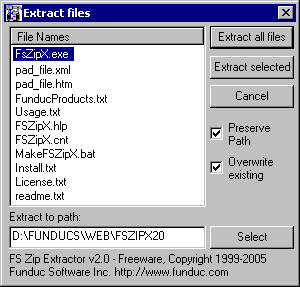
FSX.EXE (280K) - Run fsx.exe, which is a self-extracting zip and unzip into the subdirectory of your choice. See the readme.txt and the FS ZIP Extractor page for more information.

TZAdjust is a freeware product we created for users who find it necessary to make manual changes to the time zone and 'day light savings' offset parameters for Windows Vista and above computers. TZAdjust allows you to adjust the bias associated with your time zone and daylight savings adjustment. Do not use TZAdjust if you are not familiar with the effects of adjusting these OS parameters. See the TZAdjust page and an information page on Reported File Times for more information.
TZAdjust is for Windows Vista, Windows 7, Windows 8, & Windows 10 .
tzadjust.zip (120K) - Unzip this to the subdirectory of your choice. We recommend using c:\tools\TZAdjust although any path will do. See 'Install.txt' and 'ReadMe.txt' in the distribution for more information.

The Search and Replace Regular Expression Wizard is a freeware complement to our Search and Replace program. The "Wizard" is used to help you learn about the grep regular expression features of Search and Replace. The program uses a color coded display to show the effect of regular expression operators in the context of a sample text that you supply. The Wizard can also be used to help you debug complex expressions.
"Regular Expressions" are special characters and operators that allow the program to find strings in a file(s) when the text varies. For example, if you wanted to file the "title" text in some html files, a regular expression search term such as <title>*[]</title> would work. Special regular expression replacement operators are also available.
Please see the SR Wizard main page for more information and download links.
SR Wizard is for Windows Vista, Windows 7, Windows 8, & Windows 10.

Word Search and Replace is a freeware macro for Microsoft Word. This macro uses the search and replace functions built-in to Microsoft Word to perform search-replace on one or more Word .doc files. It can also be used on other file formats understood by your Word installation.
Please see the Word Search and Replace page for more information and download links.
Word SR is for Windows Vista/Windows 7/Windows 8/Windows 10. It was developed and tested on Office 2000 & 2003 and works on versions up to Office 2018. The macro may not work properly on some Word 97 installations. Please test first on not production files. Of course always keep backups no matter what Office version you are using!!

A companion to 'WordSR', Excel Search and Replace does search (and replaces) in Microsoft Excel spreadsheets.
Excel SR is for Vista, Windows 7, Windows 8, & Windows 10. It was developed and tested on Office 2000 & 2003 and works on versions up to Office 2018.
Please see the Excel Search and Replace page for more information and download links.

A companion to 'WordSR' and 'ExcelSR', PowerPoint Search and Replace does search (and replaces) in Microsoft PowerPoint files.
PowerPoint SR is for Windows Vista, Windows 7, Windows 8, & Windows 10. It was developed and tested on Office 2000 & 2003 and works on versions up to Office 2018.
Please see the PowerPoint Search and Replace page for more information and download links.
 Folder Synchronize Script Editor
The Folder Synchronize Script Editor is an little app we prepared to help with editing and creating scripts for Folder Synchronize and Directory Toolkit. Script functions can be selected from choices available - no need to remember the names of the various script switches.
Please see the Folder Synchronize Script Editor page for more information and download links.
Folder Synchronize Script Editor is for Windows Vista, Windows 7, Windows 8, & Windows 10.

FSHED - Funduc Software Hex Editor - a freeware hex editor we made for users of our Search and Replace, Replace Studio Pro & Replace Studio Business Edition grep utilities who needed a hex editor/viewer for use when search-replacing binary files. FSHED is not intended to be a full featured programmers hex editor. But if you need a lightweight editor that is free, you are welcome to use it. FSHED features include: Multi-file editing; File Insert; Revert; Bookmarks; Clipboard Paste choices; Block Selection; Search/Replace; Read only switch; Print Preview; Display Choices (Bytes per line, Offset length, ANSI/OEM, Little-Endian/Big-Endian, Font Size, Screen Colors, & more); Command Line Switches (offset at offset & selection length); & more.
FSHED is available in separate 32-bit & 64-bit versions. The program runs Windows Vista and above, including Windows 7, Windows 8, & Windows 10.
Please see the FSHED page for more information and downloads.